
Specs are compiled from manufacturer listings and verified buyer reviews and can change over time — please confirm the key details on the product page before buying.
That dull ache in your wrist or forearm after a few hours at the screen is a sign your mouse is working against you. A standard flat mouse forces your arm into a twisted position, and that twist can turn a simple workday into real pain. The fix is a design that keeps your hand in a neutral handshake position.
I’m Emma — the founder and writer behind Snuggy Mom. This guide is built by comparing the manufacturers’ published specifications and the patterns across verified customer reviews, so you get each pick’s real strengths and trade-offs instead of marketing spin.
Every choice here is focused on one goal: giving you a computer mouse for wrist pain that genuinely changes how your hand and arm feel by the end of the day.
Our Picks at a Glance


How To Choose The Best Computer Mouse for Wrist Pain
The first thing to understand: your wrist pain often comes from a simple mechanical issue. A standard mouse forces your palm to face down, which twists the two bones in your forearm (the radius and ulna). Over a long day, that twist creates tension in your tendons. An ergonomic mouse changes that angle entirely.
Vertical Angle and Handshake Posture
A vertical mouse tilts your hand between 20 and 65 degrees so your palm faces inward, like a handshake. This keeps your forearm, wrist, and hand in a straight line. A steeper angle (closer to 65 degrees) mimics a neutral resting position more closely, but it also takes longer to adjust to.
Trackball vs Vertical Mice
A vertical mouse still requires arm movement, just in a healthier position. A trackball mouse stays stationary while you roll a ball with your thumb or fingers. This is better for very small desks or if you have shoulder issues, since it removes nearly all arm movement.
Customizable Buttons and DPI
Extra buttons you can reprogram (for example, copy/paste or a browser back button) mean you click less overall. DPI (dots per inch) controls cursor sensitivity — a higher DPI makes the cursor move faster with less physical hand movement, which further reduces strain on a tired wrist.
Quick Comparison
| Model | Best For | Design Type | Tilt Angle | Buttons | Amazon |
|---|---|---|---|---|---|
| Logitech MX Ergo S★ Best Overall | Trackball lovers & serious ergonomics | Trackball (thumb) | 20° | 6 | Amazon |
| Razer Pro Click V2Master of Connectivity | Multi-device power users | Vertical | N/A | N/A | Amazon |
| Evoluent VM4S SmallSmall Hands Specialist | Small hands & wired reliability | Vertical | Handshake | 6 | Amazon |
| Logitech Lift (Renewed) | Small to medium hands | Vertical | 57° | 4 | Amazon |
| Ergodriven Om | Onboard customization without software | Vertical | Handshake | 5 | Amazon |
| Nulea M514 | Budget trackball with infinite scroll | Trackball (thumb) | 65° | 6 | Amazon |
| Microsoft Sculpt | Ambidextrous comfort | Contoured | N/A | 4 | Amazon |
| Anker Vertical | Entry-level vertical at a great value | Vertical | Handshake | 6 | Amazon |
| Acer Ergonomic | Small hands on a tight budget | Vertical | 59° | 8 | Amazon |
In‑Depth Reviews
1. Logitech MX Ergo S Advanced Wireless Trackball Mouse
Our pick — 4.5★ from 750+ verified ratings; the strongest balance of quality and price.
The trackball that keeps your wrist completely still while you work.
This mouse eliminates movement. Instead of dragging your arm, you rest your hand on a sculpted platform and roll a thumb-operated ball. The 20-degree tilt keeps your forearm in a neutral posture, and The maker claims it reduces muscle strain by 27 percent.. Buyers report it resolved wrist and shoulder pain after a two-week adjustment..
The MX Ergo S has 6 programmable buttons you customize with the Logi Options+ app, and the clicks are 80 percent quieter than standard mice. You get up to 120 days on one charge, and a one-minute charge gives you 24 hours of use. Owners who use it daily praise the build, describing a “durable trackball lasting 2+ years with heavy use.” but the silicone coating can attract dust and may eventually wear smooth. skip it if you need a standard dragging motion or hate cleaning a trackball every few weeks.
Why it wins: This isn’t a quick fix — it is a permanent change in how you use a computer. It requires patience (expect a week or two to adapt to a trackball), but the relief from wrist and shoulder tension is what brings people back. The Logitech MX Ergo S’s trackball motion keeps your wrist stationary, making it a better choice than the Anker Vertical for severe wrist pain or carpal tunnel.
Reach for this if: you want a proven, long-lasting ergonomic solution and can adapt your grip for a few days.
Look elsewhere if: you need a traditional vertical mouse that slides, or if your thumb is already strained — this design relies entirely on thumb movement.
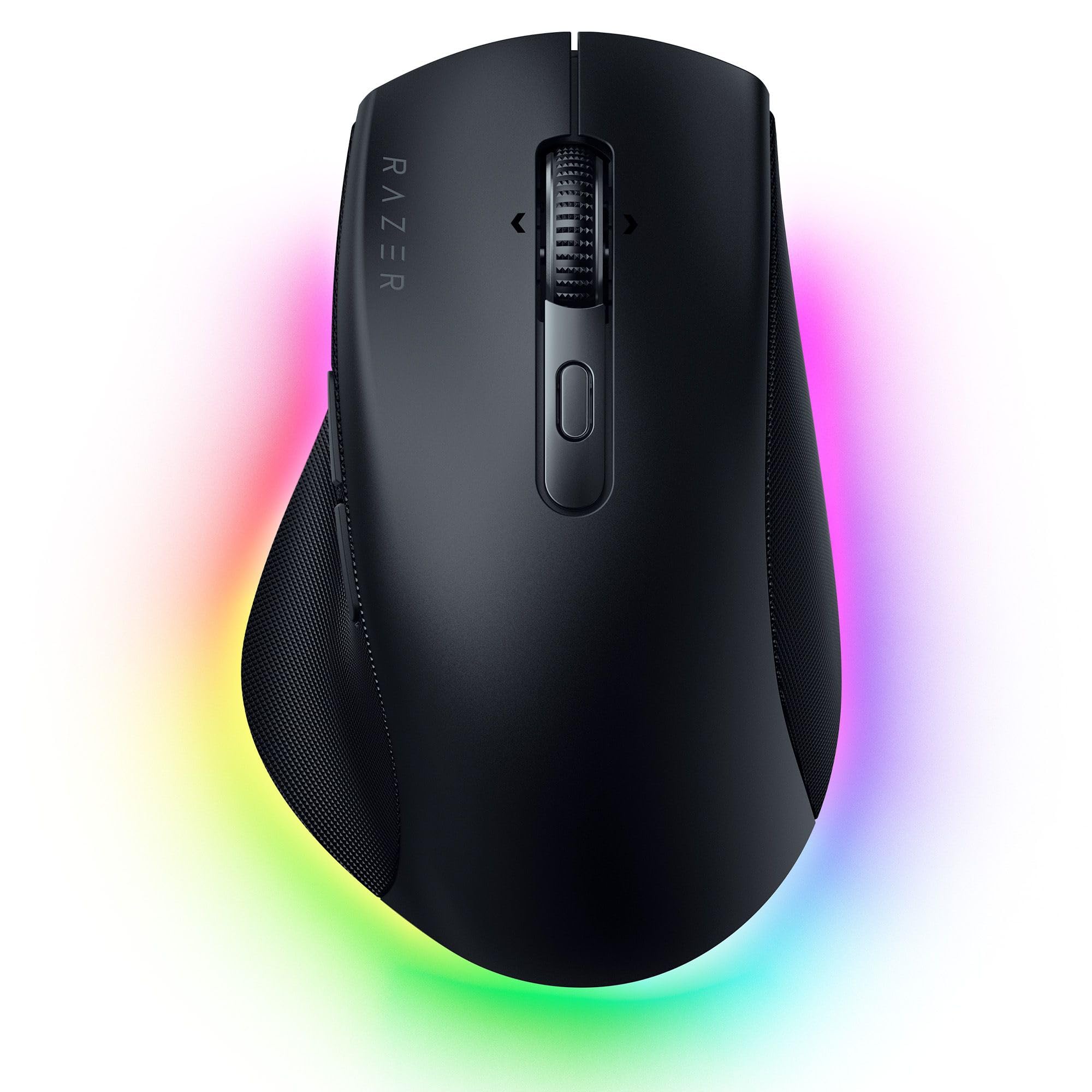
2. Razer Pro Click V2 Wireless Mouse
A premium vertical mouse that ties your whole workspace together.
This Razer is a traditional vertical mouse (you slide it), designed with a wider thumb rest for better wrist posture. Connect up to 5 devices — PC, Mac, tablet, phone — and switch between them with a dedicated button. That’s a huge convenience if you manage multiple screens.
The Focus Pro 30K Optical Sensor offers 99.8% resolution accuracy and tracks on glass.. You get up to 3.5 months of battery life, and a 5-minute charge gives you 2 working days. The Razer Synapse software lets you assign AI shortcuts, and the 14-zone Chroma RGB under-lighting can show notifications. Owners find the ergonomic shape supports the hand naturally, though some note the clicks are noisy and the mouse feels heavy to lift.
What wins people over
- Multi-device switching (up to 5) with a single button
- Premium sensor tracks on a glass surface
- Quick charge gets you through days on a brief plug-in
The honest trade-offs
- Clicks are louder than other ergonomic picks
- Heavier feel when lifting and repositioning
- Battery drains faster with RGB lighting and the 1000Hz polling rate active
Best for multi-taskers: If you toggle between a laptop, desktop, and tablet all day, the smooth switching justifies the pick. Unlike the Logitech MX Ergo S, this is a sliding vertical mouse — ideal for productivity but not pure medical relief.
Think twice if: you want whisper-quiet operation or a lightweight mouse to flick around a small desk.
3. Evoluent VM4S Ergonomic Vertical Mouse Small Wired USB
The original vertical mouse, still one of the best for small hands.
Invented by Jack Lo in 1994, this design has decades of real-world use. The VM4S puts your hand in a neutral handshake position with a dedicated pinky support that prevents your smallest finger from rubbing the desk — a detail many vertical mice miss. It is wired, so zero lag and no batteries to replace.
The small size is the key feature. Buyers with hands under 7 inches say it eliminated palm pain and wrist swelling in about a week.. You get 6 customizable buttons and 4 levels of pointer speed. The most-cited positive is wrist comfort. The catch: it is a premium wired mouse without Bluetooth, and some owners find the bottom thumb button awkwardly placed. Unlike the Logitech Lift, which targets small hands at a 57-degree angle, this one offers a steeper handshake posture with the pinky rest.
The clear advantage: This is one of the few options where small-handed buyers consistently say the fit is perfect. It works instantly with any USB device — no software required for basic operation.
Reach for this if: you have small hands, want a wired connection, and your primary goal is wrist pain relief.
Look elsewhere if: you need cordless, have large hands, or want to switch between multiple devices wirelessly.
4. Ergodriven Om Vertical Ergonomic Mouse

A vertical mouse that remaps buttons without downloading anything.
This mouse has an onboard OLED screen. You adjust DPI (4 settings: 1200, 1600, 2000, 2400) and assign custom functions like copy/paste directly on the mouse in under 10 seconds. The shape is a true handshake design with silent, micro-force buttons that reduce the tension needed to click.
Battery life is rated at 5 weeks, and it ships with at least 50 percent charge. It connects via 2.4GHz dongle and Bluetooth. Owners praise the quality, comfort, and button responsiveness. The downsides: the size runs small for some users (a few report wrist pain from prolonged use), and the sensor liftoff distance (over an inch) means it tracks even when you lift the mouse slightly, which can disorient gamers.
Why it works
- Onboard OLED screen and button remapping
- Silent clicks reduce finger fatigue
- Dual connectivity (2.4GHz + Bluetooth)
Where it struggles
- Can feel cramped for larger hands
- High sensor liftoff distance
- Macro options limited to preset functions
Perfect for productivity buffs: If you want to program copy/paste without installing bloatware, this is your pick. Unlike the Razer Pro Click V2, which relies on Synapse software, the Om does it on-device.
Not for: large-handed users or anyone needing a fast-paced gaming mouse.
5. Logitech Lift Vertical Ergonomic Mouse (Renewed)

A 57-degree angle that feels like a comfortable handshake.
Logitech’s Lift is tailored for small to medium right hands. Its 57-degree vertical tilt promotes a natural forearm posture, and it is certified by ergonomists. The textured grip has a snug thumb rest, and the clicks are whisper-quiet.
It connects via Bluetooth Low Energy or the Logi Bolt USB receiver, and the battery is rated for up to 2 years (using a single AA battery). Owners mention comfort and ergonomics as standouts, with several noting it resolved wrist and forearm pain, even earning approval from their chiropractor. Some found it a bit tall and prone to tipping, and real-world battery life can vary.
The simple verdict: A comfortable, quiet daily driver for smaller hands. Unlike the Nulea M514’s 65-degree tilt, the Lift’s 57-degree angle requires a shorter adjustment period. The renewed model saves money on a proven design.
Ideal for: small to medium hands, quiet offices, and anyone wanting a simple vertical mouse with long battery life.
Skip if: you have large hands or need a rechargeable mouse with USB-C.
6. Nulea M514 Wireless Trackball Mouse

A vertical trackball that works on a plane seat tray or café table.
This hybrid combines a vertical mouse posture (65-degree angle) with a thumb-operated trackball. The cursor moves when you roll the ball — no arm dragging needed. Use it on your leg, a small tray, or any surface.
The infinite scroll wheel switches between precise and fast modes based on spin speed. It connects to up to 3 devices via Bluetooth or USB receiver. Owners praise the build quality, smooth bearings, and responsive tracking. Compromises: the build feels less premium than the Logitech MX Ergo S, and users with larger hands (around 7 inches) found it slightly too small.
The strengths
- Works on any surface
- Infinite scroll wheel for long documents
- Multi-device pairing (3 devices) at a budget price
The caveats
- Plastic build feels less solid than the Logitech MX Ergo S
- Smaller size may not fit larger hands
- Thumb navigation buttons can be finicky
Best for travelers: The infinite scroll is a genuine productivity boost. Unlike the Ergodriven Om, which requires desk space, this trackball works anywhere.
Not for: users with large hands or those wanting the highest-end materials.
7. Microsoft Sculpt Wireless Ergonomic Mouse
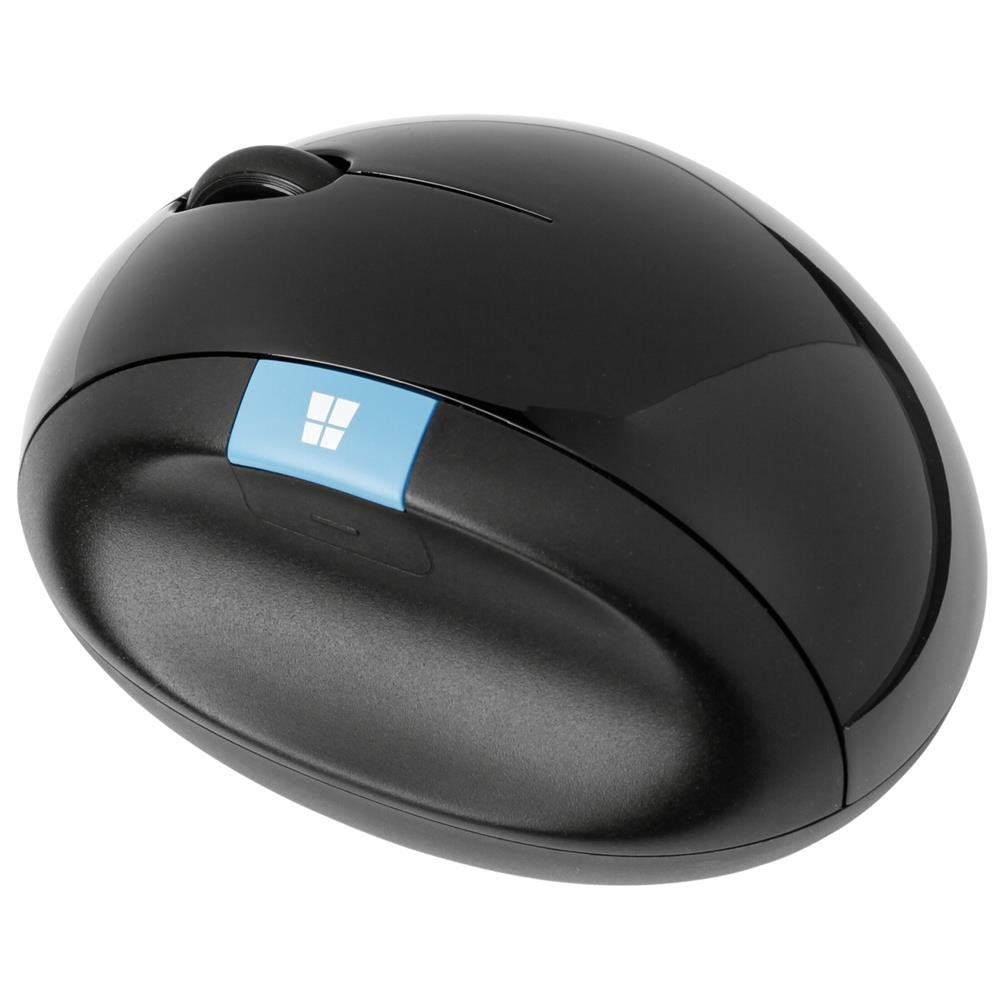
A classic curved shape that works for lefties and righties.
The Sculpt is not a vertical mouse — it is a contoured mouse that lifts the back of your palm into a natural angle while keeping your fingers low. Its rounded shape fits comfortably in the hand, and it’s ambidextrous. Buyers with large hands find it particularly comfortable.
It runs on one AA battery and connects via a USB receiver. Owners mention smooth gliding and precise tracking. A key limitation: one reviewer noted it “is not connecting to Bluetooth” — this mouse uses a proprietary wireless receiver, so losing it makes the mouse unusable. No Bluetooth option exists. The scroll wheel lacks the free-spinning feature of some Logitech mice.
The bottom line: A comfortable, time-tested shape. Keep the receiver in the mouse’s storage compartment when traveling. Unlike the Nulea M514, which offers Bluetooth, this is receiver-only.
Good pick if: you want a lightweight, ambidextrous mouse with a gentle ergonomic curve for a dedicated desk.
Pass if: you need Bluetooth or travel frequently.
8. Anker 2.4G Wireless Vertical Ergonomic Optical Mouse

The entry-level vertical that proved the handshake design works.
With tens of thousands of reviews, this is the most-tested budget pick. It puts your hand in a handshake posture with a rubbery matte finish, 3 DPI settings (800, 1200, 1600), and forward/back buttons. It enters a power-saving mode after 8 minutes of inactivity.
Owners confirm it relieves wrist strain and carpal tunnel pain after a 3-day adjustment.. The build is solid, clicks satisfying, and tracking works on most surfaces. The trade-offs: the pinky finger drags on the desk (no pinky rest), and Some users report scroll wheel failure after about 1.5 years.. It requires 2 AAA batteries (not included). Unlike the Acer Ergonomic’s 8 buttons, this one has 6.
Why it sells so well
- Proven ergonomic relief from thousands of reviewers
- Rubbery matte finish feels nicer than basic glossy plastic
- Good battery life with auto sleep after 8 minutes
The compromises
- No pinky support — your smallest finger rubs the desk
- Lifespan around 1.5 years for some units
- Not Bluetooth — 2.4GHz receiver only
Perfect for first-timers: If you are not sure a vertical mouse will work, this is the lowest-risk way to find out. But if pinky drag bothers you, the Evoluent VM4S’s dedicated support is worth the upgrade.
9. Acer Ergonomic Mouse Wireless with Side Scroll Wheel

A vertical budget pick with a surprising 8-button setup.
The Acer Neo packs an 8-button layout with a 59-degree vertical tilt. It includes a side scroll wheel that toggles between window switching, zooming, and horizontal scrolling. You get 4 DPI levels (1200, 2400, 3200, 4000).
It is designed for small to medium hands, weighs 3 ounces (87 grams), and connects to up to 3 devices via Bluetooth 5.2 or a 2.4GHz receiver. It runs on 2 AAA batteries (not included). The 59-degree angle is steep, and the manufacturer notes a 1–2 week adjustment period. Buyers describe it as “great for carpal tunnel” and note it “prevents wrist pain during 12-hour shifts,” though some units have connectivity issues and clicking is louder than average.
The honest take: For the price, you get many buttons and a steep vertical angle. The side scroll wheel is useful for spreadsheets. Unlike the Anker Vertical’s 3 DPI levels, this offers 4. The main trade-offs: loud clicks and disposable batteries.
Best for: budget-conscious buyers with small to medium hands wanting maximum button customization.
Skip if: you want quiet clicks, rechargeable operation, or have large hands.
Understanding the Specs
Vertical Tilt Angle
The angle matters.. A 20-degree tilt (like the Logitech MX Ergo S) keeps you close to a standard orientation with a slight forearm lift. Steeper angles get your palm closer to a true handshake position — the Nulea M514 at 65 degrees is among the steepest. A steeper angle feels more natural for many but takes longer to adjust to.
Trackball vs Vertical Design
A vertical mouse moves across the desk like a standard mouse, just with your hand rotated. A trackball mouse stays in one place while you roll a ball (usually with your thumb). Trackballs are ideal for limited desk space or shoulder issues, but they have a longer learning curve.
Button Quantity and Programmability
More buttons reduce the clicks you need. A mouse with 6 or 8 programmable buttons lets you assign browser back/forward or copy/paste to your thumb. Most good ergonomic mice offer at least 5 buttons.
DPI (Dots Per Inch)
DPI controls cursor speed. A higher DPI means the cursor moves farther with less physical movement. For wrist pain, a moderately high DPI (1600 to 2400) helps because you cover the same screen area with smaller motions. Most ergo mice offer at least 3 adjustable DPI levels.
FAQ
How long does it take to adjust to a vertical mouse?
Can a trackball mouse really help with wrist pain?
Are wireless or wired mice better for wrist pain relief?
Will a vertical mouse work with my Mac or Chromebook?
Do I need software to use an ergonomic mouse?
Is the Razer Pro Click V2 good for gaming?
How often do I need to clean a trackball mouse?
Should I get a mouse with more buttons for wrist pain?
Can I use an ergonomic mouse if I am left-handed?
What is the difference between optical and laser sensors for an ergo mouse?
Final Thoughts: The Verdict
If you want one dependable pick, the computer mouse for wrist pain winner is the Logitech MX Ergo S because it removes wrist movement entirely with its trackball design, 20-degree tilt, and premium build quality. If you want a multi-device powerhouse for a complex desktop, choose the Razer Pro Click V2. For a budget-friendly entry into vertical mice, the Anker 2.4G Vertical is the most-reviewed proof that the handshake design works.
How We Picked
We do not accept paid placement. Every pick is matched to a real buyer and a real use-case; we do not hands-on test units.
Sources & Methodology
Specifications: manufacturer listings and product documentation. Review insights: verified customer reviews, as of July 2026. Pricing: not shown on this page (it changes often); check the current price via the retailer link.
As an Amazon Associate, Snuggy Mom earns from qualifying purchases. This does not affect which products we feature.